Python 模块及函数式编程
本文的Python知识基于 Python3
模块划分
本文的开发环境基于PTVS, 使用PyCharm也是一样的
Python是一个开源的语言
我们最快的编程方式就是使用别人已经写好的代码(不写重复代码, 不重复造轮子)
但是如果我们有一个方法, 叫Foo, 那么别人的代码中也有一个Foo
那么我们怎么来区分这两个Foo呢?
就是通过包(Package)来进行区分的
Python的包和java中的包一夜, 和C++中的命名空间一样, 都是用来区分代码的
在PTVS的项目上点击右键-->添加-->新建文件夹就可以添加一个文件夹
在PTVS的项目上点击右键-->添加-->新建项-->Python包就可以添加一个包
图示: 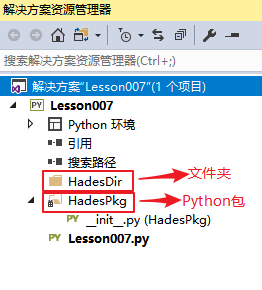
那么文件夹和包是如何区分的呢?
- 包中会存在一个
__init__.py, 就是这样区分的
那么我们在使用from xx import xx语句的时候, from后的就是包的名字
包是可以嵌套的, 使用 PackageName.PackageName 这种形式来进行引用
包和文件夹
在文件夹中新建一个py文件叫 FileDemo.py, 里边写上 FooDemo() 方法
然后在我们的py文件中进行import和调用FooDemo, 如图: 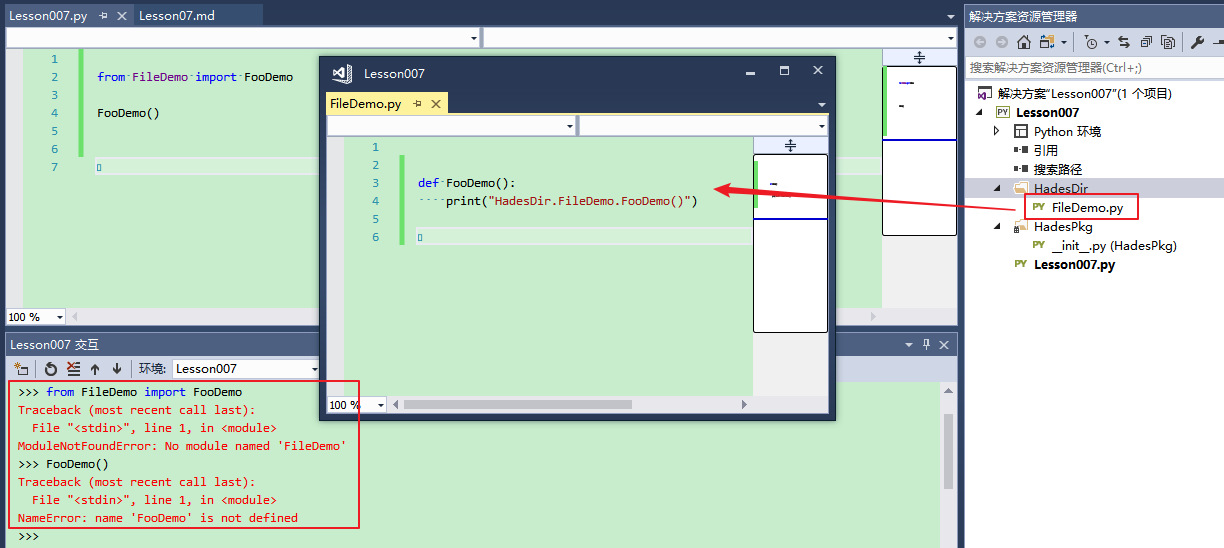
可以看到, 正常运行
在HadesPkg里新建一个PkgDemo.py, 也写上一个FooDemo
然后在__init__.py中随便输出一句话, 然后在导入运行, 如下图 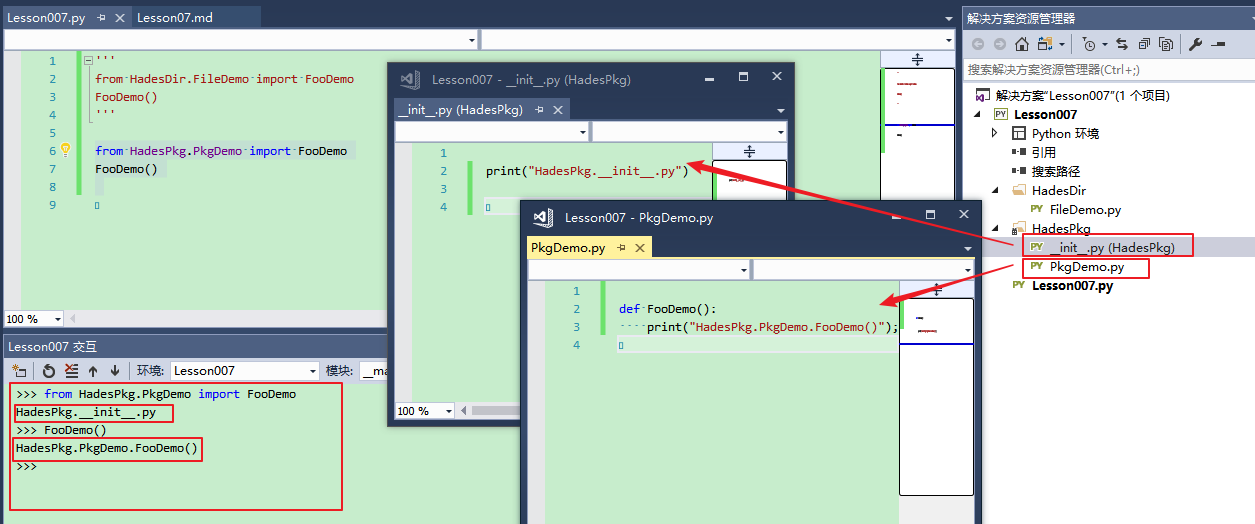
可以看到, 正常运行, 并且首先在import的时候, 就自动执行了__init__.py
所以我们的__init__.py可以放初始化的代码
包里的各个py文件, 我们称之为模块
import
- 可以用
import package_name - 可以用
from package_name import ... - 使用
package_name.package_name. ...这样的以圆点为层级的模块名结构化模块命名空间 使用
from package import item的语句, item必须要有- 它可以是
包名 - 可以是
模块名 - 可以是
方法名 - 可以是
变量名 - 可以是
类名
- 它可以是
使用
import item.subitem.subsubitem语句时- 这些item, subitem等等都必须是
包名 - 最后的subsubitem可以是包或模块, 但
不能是类, 函数, 变量等
- 这些item, subitem等等都必须是
import的各种比较
还是以我们新建的项目为例子
在PkgDemo.py中新增方法FooDemo2
我们分别测试如下代码:
注意, 为了测试准确, 每次执行到注释处, 都需要重新打开一个Python Shell
# 导入包
import HadesPkg
FooDemo()
PkgDemo.FooDemo()
HadesPkg.PkgDemo.FooDemo()
FooDemo2()
PkgDemo.FooDemo2()
HadesPkg.PkgDemo.FooDemo2()

# 导入指定包的指定模块
from HadesPkg import PkgDemo
FooDemo()
PkgDemo.FooDemo()
HadesPkg.PkgDemo.FooDemo()
FooDemo2()
PkgDemo.FooDemo2()
HadesPkg.PkgDemo.FooDemo2()

# 导入指定包的指定模块的指定方法
from HadesPkg.PkgDemo import FooDemo
FooDemo()
PkgDemo.FooDemo()
HadesPkg.PkgDemo.FooDemo()
FooDemo2()
PkgDemo.FooDemo2()
HadesPkg.PkgDemo.FooDemo2()
我们的执行结果如下:
>>> # 导入包
... import HadesPkg
...
HadesPkg.__init__.py
>>> FooDemo()
Traceback (most recent call last):
  File "<stdin>", line 1, in <module>
NameError: name 'FooDemo' is not defined
>>> PkgDemo.FooDemo()
Traceback (most recent call last):
  File "<stdin>", line 1, in <module>
NameError: name 'PkgDemo' is not defined
>>> HadesPkg.PkgDemo.FooDemo()
Traceback (most recent call last):
  File "<stdin>", line 1, in <module>
AttributeError: module 'HadesPkg' has no attribute 'PkgDemo'
>>> FooDemo2()
Traceback (most recent call last):
  File "<stdin>", line 1, in <module>
NameError: name 'FooDemo2' is not defined
>>> PkgDemo.FooDemo2()
Traceback (most recent call last):
  File "<stdin>", line 1, in <module>
NameError: name 'PkgDemo' is not defined
>>> HadesPkg.PkgDemo.FooDemo2()
Traceback (most recent call last):
  File "<stdin>", line 1, in <module>
AttributeError: module 'HadesPkg' has no attribute 'PkgDemo'
>>>
# =============分割线=============
>>> # 导入指定包的指定模块
... from HadesPkg import PkgDemo
...
HadesPkg.__init__.py
>>> FooDemo()
Traceback (most recent call last):
  File "<stdin>", line 1, in <module>
NameError: name 'FooDemo' is not defined
>>> PkgDemo.FooDemo()
HadesPkg.PkgDemo.FooDemo()
>>> HadesPkg.PkgDemo.FooDemo()
Traceback (most recent call last):
  File "<stdin>", line 1, in <module>
NameError: name 'HadesPkg' is not defined
>>> FooDemo2()
Traceback (most recent call last):
  File "<stdin>", line 1, in <module>
NameError: name 'FooDemo2' is not defined
>>> PkgDemo.FooDemo2()
HadesPkg.PkgDemo.FooDemo2()
>>> HadesPkg.PkgDemo.FooDemo2()
Traceback (most recent call last):
  File "<stdin>", line 1, in <module>
NameError: name 'HadesPkg' is not defined
>>>
# =============分割线=============
>>> # 导入指定包的指定模块的指定方法
... from HadesPkg.PkgDemo import FooDemo
...
HadesPkg.__init__.py
>>> FooDemo()
HadesPkg.PkgDemo.FooDemo()
>>> PkgDemo.FooDemo()
Traceback (most recent call last):
  File "<stdin>", line 1, in <module>
NameError: name 'PkgDemo' is not defined
>>> HadesPkg.PkgDemo.FooDemo()
Traceback (most recent call last):
  File "<stdin>", line 1, in <module>
NameError: name 'HadesPkg' is not defined
>>> FooDemo2()
Traceback (most recent call last):
  File "<stdin>", line 1, in <module>
NameError: name 'FooDemo2' is not defined
>>> PkgDemo.FooDemo2()
Traceback (most recent call last):
  File "<stdin>", line 1, in <module>
NameError: name 'PkgDemo' is not defined
>>> HadesPkg.PkgDemo.FooDemo2()
Traceback (most recent call last):
  File "<stdin>", line 1, in <module>
NameError: name 'HadesPkg' is not defined
>>>
所以, 我们需要选择合适的方式来进行import
模块化编程
将共用的方法, 拆分到一个包的单独的模块中
方便我们之后的代码复用和工程组织
默认编程规范
前边加下划线, 表示不对外公开的
整体命名规范使用下划线命名法
Python的库
在这个网站上, 有大量的Python的库
https://pypi.python.org/pypi
可以使用pip工具进行包的安装
函数式编程
with as语句
with open('xxx.txt') as file:
    pass

# 它相当于
file = open('xxx.txt')
file.close()使用with as可以自动关闭和释放资源
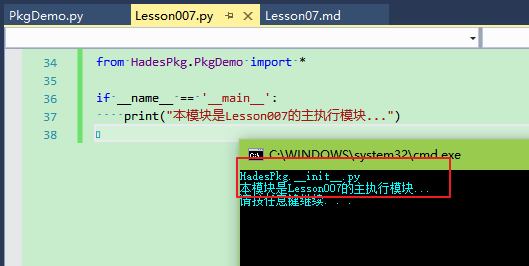
Python的py文件的执行
与C语言不一样, C语言会有一个main的入口函数
而Python却是每一个py文件都可以单独进行执行
- 在执行
import语句的时候, 会自动执行import的模块代码 在有多个py文件进行执行的时候(也就是项目中py代码的执行方式)
- 它会有一个主运行py文件
- Python中有一个
__name__的默认变量 被
开始执行(启动项目运行的主运行模块)的py文件的__name__是__main__- 每一个py项目运行的时候, 只会有一个
__main__
- 每一个py项目运行的时候, 只会有一个
- 而被import的py文件的__name__是
模块的名字 - 可以通过这个特性进行一些判定, 避免一些在import状态下不必要执行的代码执行
执行效果: 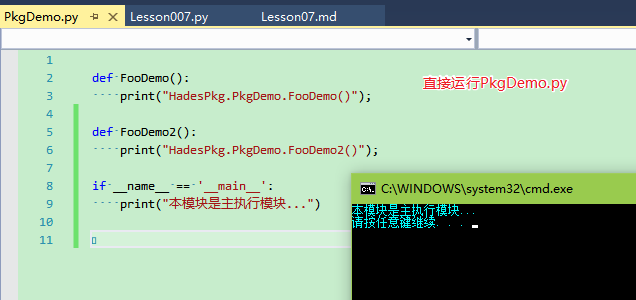
路径问题
编写Python程序时需要注意
- 模块中
不要使用相对路径打开文件或者其他资源 - 模块中
更不要使用绝对路径打开文件或者其他资源 - 应该使用
路径传递的方法来给方法指定需要打开的文件或资源 因为Python的运行文件不同也会导致相对路径不同
- 特别是在不同的包中
方法的参数
很多时候可以看到Python的方法都是以*args或者**args的方式来传递的
- *args 代表参数是以
list(列表)方式进行传递 - **args 代表参数是以
dict(字典)方式进行传递 - 当一个list对象需要传递给 *args 参数的时候, 需要加
* - 当一个dict对象需要传递个 **args 参数的时候, 需要加
**
>>> def Foo(*args):
...     print(type(args))
...     print(*args)
...     for v in args:
...         print(v)
...
>>> def FooDict(**args):
...     print(type(args))
...     print(*args)
...     for v in args:
...         print(v)
...         print(args[v])
...
>>> Foo(1,3,5,7,9)
<class 'tuple'>
1 3 5 7 9
1
3
5
7
9
>>> lst = [1,2,3,4,5]
>>> Foo(lst)
<class 'tuple'>
[1, 2, 3, 4, 5]
[1, 2, 3, 4, 5]
>>> Foo(*lst)
<class 'tuple'>
1 2 3 4 5
1
2
3
4
5
>>> FooDict(a = 1, b = 2, c = 3, d = 4)
<class 'dict'>
a b c d
a
1
b
2
c
3
d
4
>>> mydict = {'a':1, 'b':2, 'c':3}
>>> FooDict(mydict)
Traceback (most recent call last):
  File "<stdin>", line 1, in <module>
TypeError: FooDict() takes 0 positional arguments but 1 was given
>>> FooDict(**mydict)
<class 'dict'>
a b c
a
1
b
2
c
3
>>>
未完待续...
如有错误,请提出指正!谢谢.
本文由 花心胡萝卜 创作,采用 知识共享署名4.0 国际许可协议进行许可
本站文章除注明转载/出处外,均为本站原创或翻译,转载前请务必署名
最后编辑时间为: 2017-07-19 at 10:34 am