Windows 进程及线程(二)
进程路径
进程所在目录
- GetCurrentDirectory // 获取所在目录
- SetCurrentDirectory // 设置所在目录
- 在VS调试状态下, 它会自动被设置为源代码所在目录
- 当单独运行的时候, 它是我们exe所在的目录, 不包括文件名
进程当前目录
- 当前目录是针对盘符的
- 比如:
CreateFile(TEXT(D:Demo.txt), ....); 注意, D:后没有斜杠- 每一个驱动器, 都会有一个当前目录
- 主要应用于我们一些临时文件的创建或保存
当使用SetCurrentDirectory修改所在目录时, 当前目录也会被就改- 它其实是一个
环境变量 - 但是,
SetCurrentDirectory不会影响我们环境变量的值 - 修改环境变量, 会使我们的当前目录被修改
Module所在目录
- 其实就是当前可执行程序文件的目录+文件名
总结
环境变量
在我们的进程中, 我们有一些环境变量:
=C: =D: =E: =F: ... (有几个盘符就有几个)
它是我们进程默认的当前目录设置
所在目录*
启动的时候分配的, 默认是在exe所在目录下
可以进行修改
修改的同时, 会将当前盘符下的当前目录同时更改
当前目录
当前目录是针对盘符的
它会因为我们修改所在目录而发生改变
例子
#include <Windows.h>
#include <tchar.h>

int _tmain(int, TCHAR**)
{
    // 获取所在目录
    TCHAR szCurrDir[MAX_PATH] = {0};
    GetCurrentDirectory(MAX_PATH, szCurrDir);
    _tprintf(TEXT("所在目录:[%s]\n"), szCurrDir);

    // 获取Module目录
    TCHAR szModulePath[MAX_PATH] = {0};
    GetModuleFileName(NULL, szModulePath, MAX_PATH);
    _tprintf(TEXT("Module目录:[%s]\n"), szModulePath);


    // 获取当前目录
    TCHAR szFullPathName[MAX_PATH] = {0};
    GetFullPathName(TEXT("C:"), MAX_PATH, szFullPathName, NULL);
    _tprintf(TEXT("原始FullPathName-C:[%s]\n"), szFullPathName);
    GetFullPathName(TEXT("D:"), MAX_PATH, szFullPathName, NULL);
    _tprintf(TEXT("原始FullPathName-D:[%s]\n"), szFullPathName);

    // 获取环境变量
    TCHAR szEnvValue[MAX_PATH] = {0};
    GetEnvironmentVariable(TEXT("=C:"), szEnvValue, MAX_PATH);
    _tprintf(TEXT("环境变量C:[%s]\n"), szEnvValue);
    GetEnvironmentVariable(TEXT("=D:"), szEnvValue, MAX_PATH);
    _tprintf(TEXT("环境变量D:[%s]\n"), szEnvValue);

    // 更改所在目录
    SetCurrentDirectory(TEXT("C:\\"));
    GetCurrentDirectory(MAX_PATH, szCurrDir);
    _tprintf(TEXT("修改后的所在目录:[%s]\n"), szCurrDir);
    GetFullPathName(TEXT("C:"), MAX_PATH, szFullPathName, NULL);
    _tprintf(TEXT("修改后的FullPathName-C:[%s]\n"), szFullPathName);
    GetFullPathName(TEXT("D:"), MAX_PATH, szFullPathName, NULL);
    _tprintf(TEXT("修改后的FullPathName-D:[%s]\n"), szFullPathName);

    // 获取环境变量
    GetEnvironmentVariable(TEXT("=C:"), szEnvValue, MAX_PATH);
    _tprintf(TEXT("环境变量C:[%s]\n"), szEnvValue);
    GetEnvironmentVariable(TEXT("=D:"), szEnvValue, MAX_PATH);
    _tprintf(TEXT("环境变量D:[%s]\n"), szEnvValue);

    // 更改环境变量
    SetEnvironmentVariable(TEXT("=D:"), TEXT("D:\\"));
    GetFullPathName(TEXT("D:"), MAX_PATH, szFullPathName, NULL);
    _tprintf(TEXT("修改环境变量后的FullPathName-D:[%s]\n"), szFullPathName);


    return 0;
}
CreateProcess
它可以创建一个进程
- 首先它会创建一个
进程内核对象 - 这个进程内核对象并不代表进程本身
- 它是操作系统用来管理这个进程的数据结构
- 这个结构会有一个使用计数
- 会在进程被创建时设置为1
- 操作系统为新进程床建一个虚拟地址空间, 将其所需的代码和数据加载到进程的地址空间中
- 之后, 操作系统为新进程的主线程创建一个线程内核对象
- 线程对象的使用计数也会被设置为1
- 主线程最终会调用我们的
入口函数
注意:
内核对象都有`使用计数`
当被使用的时候, 使用计数会加一
当不被使用的时候, 使用计数会减一
当使用计数为0的时候, 操作系统会丢内核对象进行回收成功创建了新进程和主线程, 函数会返回TRUE
被创建出来的进程会形成父子关系, 启动的进程为父进程, 被启动的进程为子进程
但是, 父进程和子进程是独立的两个进程
它们是不能直接进行通信的
参数解析
BOOL WINAPI CreateProcess(
  _In_opt_    LPCTSTR               lpApplicationName,
  _Inout_opt_ LPTSTR                lpCommandLine,
  _In_opt_    LPSECURITY_ATTRIBUTES lpProcessAttributes,
  _In_opt_    LPSECURITY_ATTRIBUTES lpThreadAttributes,
  _In_        BOOL                  bInheritHandles,
  _In_        DWORD                 dwCreationFlags,
  _In_opt_    LPVOID                lpEnvironment,
  _In_opt_    LPCTSTR               lpCurrentDirectory,
  _In_        LPSTARTUPINFO         lpStartupInfo,
  _Out_       LPPROCESS_INFORMATION lpProcessInformation
);
lpApplicationName
指定新进程要使用的执行体的文件名
当在lpApplicationName传一个文件路径时, 如果给的是一个相对路径
那么它只会在exe所在目录下来进行查找
当它不是NULL时, lpCommandLine会被作为命令行参数传递
lpCommandLine
传递给新进程的命令行字符串
如果lpApplicationName为NULL, 可以在lpCommandLine中传递一个文件路径
如果传递的是一个相对路径, 它会按照如下顺序进行查找:
- 所在目录
- 当前目录
- Windows系统目录(System32)
- Windows目录
- Path环境变量中列出的目录
注意, lpCommandLine会被CreateProcess内部修改, 所以我们不应该传递一个常量指针
lpProcessAttributes
设置进程内核对象的安全属性
可以设置为NULL.
lpThreadAttributes
设置主线程内核对象的安全属性
可以设置为NULL.
bInheritHandles
是否有被继承
可以设置为FALSE.
dwCreationFlags
进程创建方式的标识
CREATE_NO_WINDOW
- 标识只是系统不要为应用程序创建任何
控制台窗口 - 可以使用这个标识来执行没有用户界面的控制台应用程序
- 标识只是系统不要为应用程序创建任何
- 其他请查询MSDN
lpEnvironment
它指向一个内存块, 其中包含了新进程要会用的环境变量字符串
大多数时候, 这个参数的值都为NULL
这使得子进程继承父进程使用的一组环境变量字符串
还可以使用GetEnvironmentStrings函数来进行传递
lpCurrentDirectory
允许父进程设置子进程的当前驱动器和目录
如果参数为NULL, 新进程的工作目录与生成新进程的应用程序相同
lpStartupInfo
此结构体一定要清零, 否则成员间包含主调线程对站上的垃圾数据
typedef struct _STARTUPINFO {
  DWORD  cb;                // 初始化为sizeof(STARTUPINFO)
  LPTSTR lpReserved;        // 保留, 必须初始化为NULL
  LPTSTR lpDesktop;         // 启动应用程序的桌面名称
  LPTSTR lpTitle;           // 控制台下可用, 指定控制台的窗口标题
  DWORD  dwX;               // 屏幕的位置 X坐标
  DWORD  dwY;               // 屏幕的位置 Y坐标
  DWORD  dwXSize;           // 屏幕宽度
  DWORD  dwYSize;           // 屏幕高度
  DWORD  dwXCountChars;     // 控制台下可用, 控制台的宽度
  DWORD  dwYCountChars;     // 控制台下可用, 控制台的高度
  DWORD  dwFillAttribute;   // 控制台下可用, 控制台的文本和背景色
  DWORD  dwFlags;           // 组合值, 详情见下方
  WORD   wShowWindow;       // GUI可用, 窗口如何显示
  WORD   cbReserved2;       // 保留
  LPBYTE lpReserved2;       // 保留
  HANDLE hStdInput;         // 标准输入
  HANDLE hStdOutput;        // 标准输出
  HANDLE hStdError;         // 标准错误输出
} STARTUPINFO, *LPSTARTUPINFO;
Flags的取值
| Value | Meaning |
|---|---|
| <dl> <dt> <span style="font-weight:bold">STARTF_FORCEONFEEDBACK</span></dt> <dt>0x00000040</dt></dl> | <p>Indicates that the cursor is in feedback mode for two seconds after <span style="font-weight:bold">CreateProcess</span> is called. The Working in Background cursor is displayed (see the Pointers tab in the Mouse control panel utility).</p> <p>If during those two seconds the process makes the first GUI call, the system gives five more seconds to the process. If during those five seconds the process shows a window, the system gives five more seconds to the process to finish drawing the window.</p> <p>The system turns the feedback cursor off after the first call to <span style="font-weight:bold">GetMessage</span>, regardless of whether the process is drawing.</p> |
| <dl> <dt> <span style="font-weight:bold">STARTF_FORCEOFFFEEDBACK</span></dt> <dt>0x00000080</dt></dl> | <p>Indicates that the feedback cursor is forced off while the process is starting. The Normal Select cursor is displayed.</p> |
| <dl> <dt> <span style="font-weight:bold">STARTF_PREVENTPINNING</span></dt> <dt>0x00002000</dt></dl> | <p>Indicates that any windows created by the process cannot be pinned on the taskbar.</p> <p>This flag must be combined with STARTF_TITLEISAPPID.</p> |
| <dl> <dt> <span style="font-weight:bold">STARTF_RUNFULLSCREEN</span></dt> <dt>0x00000020</dt></dl> | <p> Indicates that the process should be run in full-screen mode, rather than in windowed mode.</p> <p>This flag is only valid for console applications running on an x86 computer.</p> |
| <dl> <dt> <span style="font-weight:bold">STARTF_TITLEISAPPID</span></dt> <dt>0x00001000</dt></dl> | <p>The <span style="font-weight:bold">lpTitle</span> member contains an AppUserModelID. This identifier controls how the taskbar and <span style="font-weight:bold">Start</span> menu present the application, and enables it to be associated with the correct shortcuts and Jump Lists. Generally, applications will use the <span style="font-weight:bold">SetCurrentProcessExplicitAppUserModelID</span> and <span style="font-weight:bold">GetCurrentProcessExplicitAppUserModelID</span> functions instead of setting this flag. For more information, see Application User Model IDs.</p> <p>If STARTF_PREVENTPINNING is used, application windows cannot be pinned on the taskbar. The use of any AppUserModelID-related window properties by the application overrides this setting for that window only.</p> <p>This flag cannot be used with STARTF_TITLEISLINKNAME.</p> |
| <dl> <dt> <span style="font-weight:bold">STARTF_TITLEISLINKNAME</span></dt> <dt>0x00000800</dt></dl> | <p>The <span style="font-weight:bold">lpTitle</span> member contains the path of the shortcut file (.lnk) that the user invoked to start this process. This is typically set by the shell when a .lnk file pointing to the launched application is invoked. Most applications will not need to set this value.</p> <p>This flag cannot be used with STARTF_TITLEISAPPID.</p> |
| <dl> <dt> <span style="font-weight:bold">STARTF_UNTRUSTEDSOURCE</span></dt> <dt>0x00008000</dt></dl> | <p>The command line came from an untrusted source. For more information, see Remarks.</p> |
| <dl> <dt> <span style="font-weight:bold"></span></dt> <dt></dt></dl> | |
| <dl> <dt> <span style="font-weight:bold">STARTF_USECOUNTCHARS</span></dt> <dt>0x00000008</dt></dl> | <p> The <span style="font-weight:bold">dwXCountChars</span> and <span style="font-weight:bold">dwYCountChars</span> members contain additional information.</p> |
| <dl> <dt> <span style="font-weight:bold">STARTF_USEFILLATTRIBUTE</span></dt> <dt>0x00000010</dt></dl> | <p>The <span style="font-weight:bold">dwFillAttribute</span> member contains additional information.</p> |
| <dl> <dt> <span style="font-weight:bold">STARTF_USEHOTKEY</span></dt> <dt>0x00000200</dt></dl> | <p>The <span style="font-weight:bold">hStdInput</span> member contains additional information.</p> <p>This flag cannot be used with <span style="font-weight:bold">STARTF_USESTDHANDLES</span>.</p> |
| <dl> <dt> <span style="font-weight:bold">STARTF_USEPOSITION</span></dt> <dt>0x00000004</dt></dl> | <p>The <span style="font-weight:bold">dwX</span> and <span style="font-weight:bold">dwY</span> members contain additional information.</p> |
| <dl> <dt> <span style="font-weight:bold">STARTF_USESHOWWINDOW</span></dt> <dt>0x00000001</dt></dl> | <p>The <span style="font-weight:bold">wShowWindow</span> member contains additional information.</p> |
| <dl> <dt> <span style="font-weight:bold">STARTF_USESIZE</span></dt> <dt>0x00000002</dt></dl> | <p>The <span style="font-weight:bold">dwXSize</span> and <span style="font-weight:bold">dwYSize</span> members contain additional information.</p> |
| <dl> <dt> <span style="font-weight:bold">STARTF_USESTDHANDLES</span></dt> <dt>0x00000100</dt></dl> | <p>The <span style="font-weight:bold">hStdInput</span>, <span style="font-weight:bold">hStdOutput</span>, and <span style="font-weight:bold">hStdError</span> members contain additional information.</p> <p>If this flag is specified when calling one of the process creation functions, the handles must be inheritable and the function's <span style="font-style:italic">bInheritHandles</span> parameter must be set to TRUE. For more information, see Handle Inheritance.</p> <p>If this flag is specified when calling the <span style="font-weight:bold">GetStartupInfo</span> function, these members are either the handle value specified during process creation or INVALID_HANDLE_VALUE.</p> <p>Handles must be closed with <span style="font-weight:bold">CloseHandle</span> when they are no longer needed.</p> <p>This flag cannot be used with <span style="font-weight:bold">STARTF_USEHOTKEY</span>.</p> |
一些需要注意的FLAG: 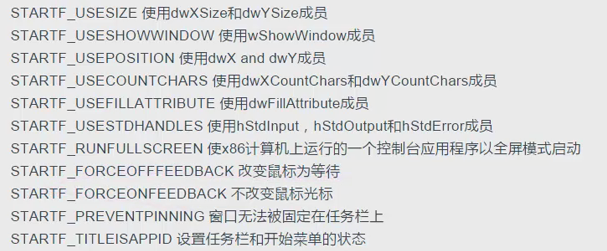
lpProcessInformation
typedef struct _PROCESS_INFORMATION {
  HANDLE hProcess;
  HANDLE hThread;
  DWORD  dwProcessId;
  DWORD  dwThreadId;
} PROCESS_INFORMATION, *LPPROCESS_INFORMATION;
输出参数, 会设置结构体的值
未完待续...
如有错误,请提出指正!谢谢.
本文由 花心胡萝卜 创作,采用 知识共享署名4.0 国际许可协议进行许可
本站文章除注明转载/出处外,均为本站原创或翻译,转载前请务必署名
最后编辑时间为: 2017-06-05 at 06:58 am